
| 일 | 월 | 화 | 수 | 목 | 금 | 토 |
|---|---|---|---|---|---|---|
| 1 | 2 | 3 | 4 | 5 | 6 | |
| 7 | 8 | 9 | 10 | 11 | 12 | 13 |
| 14 | 15 | 16 | 17 | 18 | 19 | 20 |
| 21 | 22 | 23 | 24 | 25 | 26 | 27 |
| 28 | 29 | 30 |
- 엘리스
- RN 프로젝트
- 코딩부트캠프
- 자바스크립트 reduce()
- 개발일기
- 자바스크립트 날씨
- 코드스테이츠
- 프로그래머스
- JavaScript
- [파이썬 실습] 중급 문제
- 엘리스 ai 트랙
- 삼항연산자
- 개발공부
- reactnativecli
- 프론트개발
- [파이썬 실습] 기초 문제
- [파이썬 실습] 심화 문제
- 부트캠프
- leetcode
- 리트코드
- HTML
- 자바스크립트 날씨 웹 만들기
- 자바스크립트
- 프론트개발공부
- 간단한 날씨 웹 만들기
- 날씨 웹 만들기
- 자바스크립트 sort()
- 엘리스 AI 트랙 5기
- 자바스크립트 split()
- [AI 5기] 연습 문제집
- Today
- Total
개발조각
[모두의 이력서_4일차] NODE MON 설치, MONGO URI 정보를 보호하기 본문
처음으로 혼자서 프론트부터 백까지 하는 프로젝트이다 보니 정확하지 않을 수 있습니다!
NODE MON 설치
NODE MON
소스를 변경할 때 그걸 감지해서 자동으로 서버를 재 시작해 주는 tool
1. NODE MON 다운로드
npm install nodemon --save-dev
여기서 -dev는?
로컬에서 할 때(development mode)랑, 배포를 하고 난 이후의 모드(production mode)가 있는데
dev를 붙이면 로컬에서 할 때만 사용하겠다는 의미입니다.
package.json에서 확인하실 수 있습니다.
// package.json
"devDependencies": {
	"@types/express": "^4.17.17",
	"nodemon": "^2.0.22"
}
2. 시작할 때 nodemon으로 시작
script에 하나 더 만들기 → 현재 시작할 때 npm run start를 쓰고 있습니다.
// package.json
  "scripts": {
    "start": "ts-node server.ts",
    "dev": "nodemon server.ts",
    "test": "echo \"Error: no test specified\" && exit 1"
  },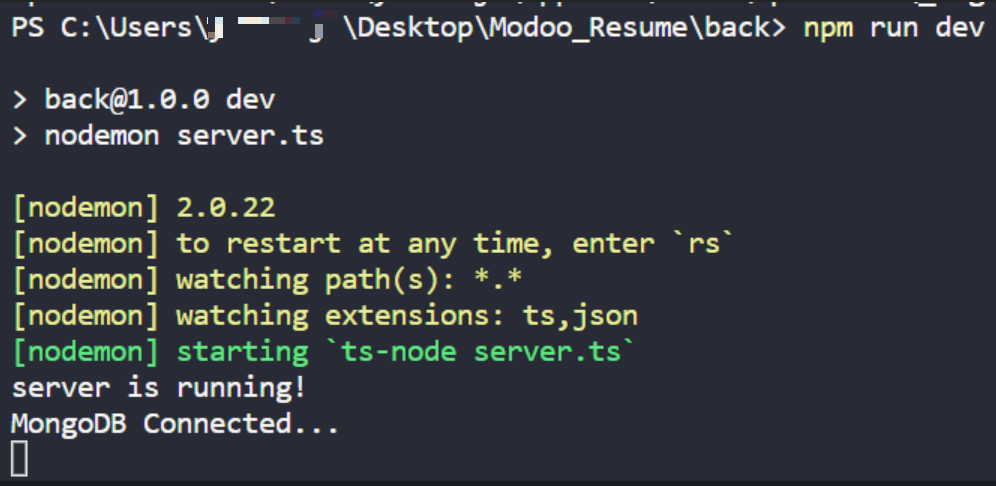
서버를 켜고 끄지 않아도 새로고침 하면 알아서 고쳐줍니다.
MONGO URI 정보를 보호하기
수정해야 되는 부분
// server.js

// 몽고디비 부분
const mongoose = require("mongoose");
mongoose
  .connect("mongodb+srv://아이디:비번@modooresume.eodr2fw.mongodb.net/?retryWrites=true&w=majority", // 이부분이 비밀정보
    {
      useNewUrlParser: true,
      useUnifiedTopology: true,
    }
  )
  .then(() => console.log("MongoDB Connected..."))
  .catch((err: "empty") => console.log(err));
몽고디비를 연결할 때 몽고디비 아이디와 비밀번호가 들어 있습니다.
지금 소스 코드를 Git에 다가 올리면 다른 사람들이 몽고디비 연결한 아이디, 비밀번호 가지고 몽고디비를 사용할 수 있습니다. → 즉 Secret 한 정보들을 다 보게 됩니다.
그래서 몽고디비 uri부분을 따로 빼놓고 gitignore에 설정해야 됩니다.
개발환경이 로컬모드 아니면 배포모드 인지에 따라 다르게 해 주어야 됩니다.
예를 들어 heroku 서비스를 통해 배포할 때는 따로 MONGO_URI 값을 따로 넣어줘야 됩니다.
즉 heroku사이트에서 직접 관리해 줍니다.
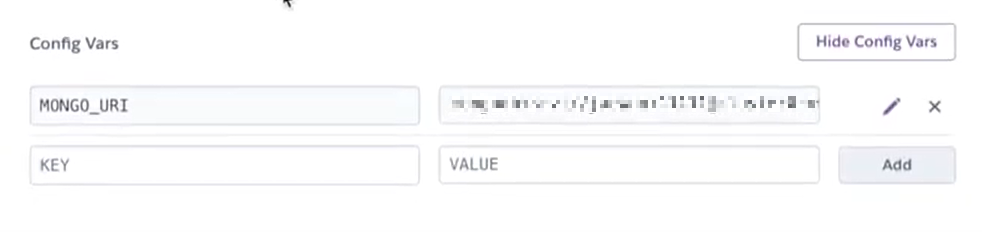
환경 변수 process.env.NODE_ENV
Local 환경에서
- development : dev.ts에서 몽고디비 가져오게 한다.
Deploy(배포) 한 후
- production : 만약 HEROKU웹사이트에서 몽고디비를 가져오게 한다.
이렇게 해 준 뒤 마지막으로 몽고 uri이 들어 있는 파일을 .gitignore에 담아줘야 됩니다.
1. 파일구성
config
|- dev.ts // development 모드일 경우
|- key.ts // development 또는 production 일때 몽고 url 보내줌
|- prod.ts // production 모드일 경우
2. dev.ts
// development
module.exports = {
  mongoURI:
    "mongodb+srv://아이디:비밀번호@modooresume.eodr2fw.mongodb.net/?retryWrites=true&w=majority",

};
3. prod.ts
// production
module.exports = {
  mongoURI: process.env.MONGO_URI,
};
4. key.ts
if (process.env.NODE_ENV === "production") {
  // 배포 한후
  module.exports = require("./prod");
} else {
  // 로컬 환경
  module.exports = require("./dev");
}
5. server.ts
const config = require("./config/key");

const mongoose = require("mongoose");
mongoose
  .connect(config.mongoURI, { // 비밀 정보 보호
    useNewUrlParser: true,
    useUnifiedTopology: true,
  })
  .then(() => console.log("MongoDB Connected..."))
  .catch((err: "empty") => console.log(err));
config.mongoURI로 교체
6. .gitignore 파일에 넣어주기
// .gitignore
node_modules
dev.ts
dev.ts가 깃허브에 소스코드를 올릴 때 안 보여야 됩니다.
require → import
이번도 어김없이 require를 import로 교체
1. dev.ts
// development
export const dev = {
  mongoURI:
    "mongodb+srv://아이디:비번@modooresume.eodr2fw.mongodb.net/?retryWrites=true&w=majority",
};
2. prod.ts
// production
export const prod = {
  mongoURI: process.env.MONGO_URI,
};
3. key.ts
import { prod } from "./prod";
import { dev } from "./dev";

// true: 배포한 후, false: 로컬 환경
export const config = process.env.NODE_ENV === "production" ? prod : dev;
4. server.ts
import express from "express";
import bodyParser from "body-parser";

import { User } from "./models/User";
import { config } from "./config/key";

const app = express();

app.use(bodyParser.urlencoded({ extended: true }));
app.use(bodyParser.json());

const mongoose = require("mongoose");
mongoose
  .connect(config.mongoURI, {
    useNewUrlParser: true,
    useUnifiedTopology: true,
  })
  .then(() => console.log("MongoDB Connected..."))
  .catch((err: "empty") => console.log(err));

app.get("/", function (req, res) {
  res.send("Hello World");
});

// 회원가입 라우터
app.post("/register", async (req, res) => {
  const user = new User(req.body);

  const result = await user
    .save()
    .then(() => {
      res.status(200).json({
        success: true,
      });
    })
    .catch((err: "empty") => {
      res.json({ success: false, err });
    });

  return result;
});

app.listen(5000, () => {
  console.log("server is running!");
});
참고자료
https://www.youtube.com/watch?v=u2nACoz4Vjg
https://www.youtube.com/watch?v=0z1jV4rzaH0&t=168s
'모두의 이력서' 카테고리의 다른 글
| [모두의 이력서_5일차] 로그인 기능 Bcrypt, jsonwebtoken (0) | 2023.03.29 |
|---|---|
| [모두의 이력서_5일차] Bcrypt로 비밀번호 암호화 하기 (0) | 2023.03.29 |
| [모두의 이력서_4일차] 회원가입 기능 만들기 (몽고디비에서) (0) | 2023.03.28 |
| [모두의 이력서_4일차] 몽고디비 Model Schema 작성하기 (0) | 2023.03.28 |
| [모두의 이력서_3일차] SSH(Secure Shell)를 이용해 GIT HUB에 연결하기 (0) | 2023.03.26 |


